This page describes a representative solution and reference architecture. It is not presented as a client case study or as evidence of a completed implementation.
Customer & Partner Portal
A reference architecture for a self-service portal that gives external customers or partners secure, scoped visibility into their own orders, documents, and account data — sourced from existing internal systems rather than a parallel copy of them.
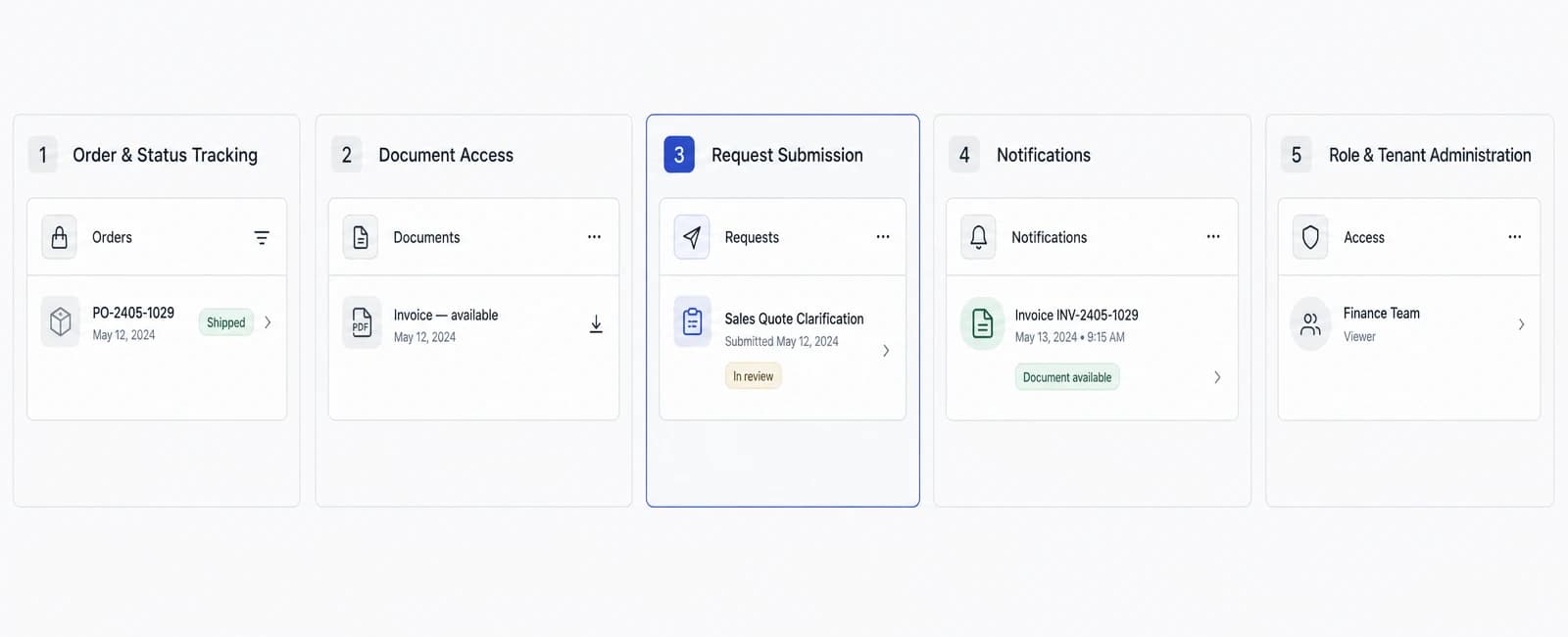
A customer and partner portal, in this reference architecture, is a self-service web platform that gives external customers or partners secure, scoped visibility into their own orders, documents, and account data — pulled from a business's existing internal systems rather than a separate copy of that data. It illustrates how North Tech Labs would approach reducing status-check support volume by giving external users direct access to information they currently have to request by phone or email, not a description of a portal already delivered to a named client.
The business problem
Many businesses that serve external customers or partners — buyers checking on an order, suppliers confirming a delivery, distributors managing an account — handle a steady volume of status inquiries through phone calls, email threads, and shared spreadsheets. The underlying information (an order's status, an invoice, a shipment date) usually already exists in an internal system; the customer or partner simply has no direct way to see it.
That gap creates a recurring cost on both sides. Internal staff spend time answering questions that don't require judgment — "where is my order," "can I get a copy of that document," "what's the status of my request" — instead of handling exceptions that actually need a person. External customers and partners, in turn, wait on a reply rather than getting an answer immediately.
The volume of these interactions tends to grow with the number of active customers or partners, not with the complexity of the business, which makes it a particularly clear candidate for self-service: the same handful of questions, asked repeatedly, by an increasing number of external parties.
A customer and partner portal, as a category, is a way to close that gap by giving external users direct, scoped access to their own data — without giving them access to internal systems, or to any other customer's or partner's data. It is not a claim that every external interaction can or should be automated away.
Intended users & roles
- External customerViews their own order status, invoices, and documents, and submits requests without contacting support directly.
- External partner or vendorViews shared orders, purchase orders, or shipment data relevant to the business relationship, and submits or tracks requests tied to it.
- Internal account managerMonitors activity and requests for the accounts they manage, and steps in when a request needs judgment or escalation.
- Support or operations staffHandles requests routed from the portal that don't resolve through self-service, and manages exceptions.
- Platform administratorManages user access, tenant configuration, and what data or actions each external role can see or perform.
Core modules
- Order & status trackingLets an external user view the current status and history of their own orders, without needing to contact support for an update.
- Document accessProvides scoped access to relevant documents — invoices, contracts, shipment records — tied to the user's account or relationship.
- Request submission & trackingLets an external user submit a request (a change, a query, a claim) and track its status through resolution, rather than relying on an email thread.
- Account & profile managementLets a customer or partner manage their own contact details, users, and preferences within the scope the business allows.
- NotificationsAlerts a user when an order status changes, a document becomes available, or a submitted request is updated.
- Internal-facing activity viewGives internal account managers and support staff visibility into portal activity for the accounts they're responsible for.
- Role & tenant administrationLets an administrator manage which external organisations and users have access, and what each can see or do.
Example workflows
- Self-service order lookupAn external customer would log in and see the current status of their orders directly, without needing to email or call to ask, with the underlying data reflecting what the internal system currently shows rather than a delayed or cached snapshot.
- Document retrievalA partner would access an invoice or shipment document tied to their account directly through the portal, scoped to only the documents relevant to their own relationship with the business.
- Request submission and resolutionA customer would submit a request — a delivery change, a query about a charge — through a structured form, and the request would be routed to the relevant internal team and tracked through to resolution, with status visible to the customer throughout.
- Escalation to a personA request that doesn't fit the expected pattern, or that a customer marks as unresolved through self-service, would be routed to an internal account manager rather than left unanswered in a queue.
- New partner onboardingA new partner organisation would be provisioned with scoped access to only their own orders and documents, with an administrator configuring which users at that organisation can access the portal and what they can see.
Architecture overview
The platform would be built as a web application — a Next.js frontend for the external-facing portal, a Node.js API layer enforcing access control and business logic, and PostgreSQL for account, order, and request data — with a clear separation between the portal's own data model and the internal systems it reads from.
Because the portal serves external users rather than internal staff, tenant-aware access control is a foundational design constraint rather than an afterthought: every query is scoped to the authenticated user's organisation, and the data model is designed so that a request for another organisation's data isn't just denied by a permission check but structurally unreachable from a given user's session.
Internal data — order status, documents, account records — is surfaced through defined integrations with existing ERP, CRM, or order-management systems rather than the portal maintaining its own parallel source of truth. This keeps internal systems as the authoritative record and limits the portal's own footprint to session, request, and access-control data.
The system is designed to run on standard cloud infrastructure (AWS is the example used throughout this reference architecture), with the integration layer to internal systems treated as a distinct, independently securable boundary rather than direct access from the external-facing application into internal databases.
- Order & status tracking
- Document access
- Request submission & tracking
- Account & profile management
- Notifications
- Internal-facing activity view
- Role & tenant administration
- Internal system integration
- Read-through rather than replication
- Scoped data exposure
- Outbound request routing
- Validation before write
- Tenant isolation
- Role-based, scoped permissions
- Authentication and session controls
- Full audit trail
- Data retention & handling
Data & integration flow
- Internal system integrationOrder, account, and document data is read from existing internal systems (ERP, CRM, order management) through defined API integrations, not by granting the portal direct database access.
- Read-through rather than replicationWhere feasible, the portal reads current data on request rather than maintaining a separately synchronised copy, reducing the risk of showing an external user stale or inconsistent information.
- Scoped data exposureIntegrations expose only the fields and records relevant to an external user's own account or relationship, not the full internal record.
- Outbound request routingRequests submitted through the portal are routed into the appropriate internal system or team queue, rather than accumulating in a portal-only inbox no one is assigned to monitor.
- Validation before writeAny data an external user submits or changes is validated against expected schemas and business rules before it updates an internal system.
Security, governance & permissions
- Tenant isolationData belonging to one customer or partner organisation is structurally isolated from every other's, since this system serves multiple external parties who must never see each other's data.
- Role-based, scoped permissionsAccess within an organisation is further scoped by role — an individual user typically sees less than an organisation administrator — consistent with least-privilege access.
- Authentication and session controlsExternal user authentication includes standard protections (strong password policies, optional multi-factor authentication, session expiry) appropriate for internet-facing access to business data.
- Full audit trailAccess to sensitive records, and any request submitted or action taken, is logged with who acted and when, supporting later review.
- Data retention & handlingWhat data is exposed to external users, for how long records remain accessible, and how access is revoked when a relationship ends are explicit, documented decisions.
Relevant services
The engineering disciplines behind Customer & Partner Portal.
- Custom Software DevelopmentDesign and development of secure, scalable custom software for companies across Sweden and the Nordic region.
- SaaS DevelopmentDesign and development of multi-tenant SaaS products, from tenant isolation and subscription billing to self-serve onboarding.
- UX/UI DesignStandalone UX/UI design engagements — audits, redesigns, and validated prototypes — with a handoff your own engineering team can build from.
Relevant industries
Where a system like Customer & Partner Portal creates the most value.
- ManufacturingCustom manufacturing software, operational platforms and connected systems for companies modernising production across Sweden and the Nordic region.
- Logistics and MobilityCustom logistics, fleet, mobility and transport software for companies managing complex operations across the Nordic region.
- Retail and eCommerceCustom retail and eCommerce software — omnichannel inventory, checkout, personalization and returns systems for companies across Sweden and the Nordic region.
Related solutions
- ERP (Enterprise Resource Planning)A reference architecture for a custom ERP platform that centralises production planning, inventory, procurement, and financials — built to integrate with a manufacturer's existing MES, WMS, and accounting systems rather than replace them outright.
- Warehouse Management System (WMS)A reference architecture for a warehouse management system that combines mobile scanning, real-time inventory tracking, and pick/pack/ship coordination — integrated with existing ERP and transport management systems rather than replacing them.
Delivery & implementation considerations
- Phased rollout by moduleTypically implemented starting with read-only order and document visibility before adding request submission or account self-management, rather than launching every module at once.
- Coexistence with existing systemsDesigned to integrate with a business's existing ERP, CRM, or order-management systems rather than requiring a parallel system of record.
- Pilot with a limited groupOften rolled out to a small group of customers or partners first, so access-control boundaries and integration accuracy can be validated before wider availability.
- Onboarding and support transitionExisting customers and partners need a clear transition path — communication, credentials, guidance — since self-service only reduces support volume once people actually use it.
Frequently asked questions
Is this a system you've already built for a client?
No. This page describes a representative reference architecture illustrating our approach to this category of problem — it is not a case study of a completed client project.
Does this replace our internal ERP or CRM?
No. The architecture is designed to read from and integrate with an existing ERP or CRM through defined interfaces, not to replace them. Internal systems remain the authoritative record.
How is one customer's data kept separate from another's?
Tenant isolation is a foundational part of the architecture: every query is scoped to the authenticated user's own organisation, and the data model is designed so another organisation's data isn't reachable from a given session, not just hidden by a permission check.
Does this eliminate the need for support staff?
No. It's designed to reduce the volume of routine status and document requests so staff can focus on requests that need judgment or escalation, not to remove the need for a support or account team.
Can partners and customers use the same portal?
The underlying architecture — tenant-scoped access, order and document visibility, request tracking — applies to both customer- and partner-facing use cases, though the specific modules and permissions exposed to each group would typically differ.
Is this specific to one industry?
No. The pattern of giving external customers or partners self-service visibility into their own orders and documents applies across industries; this page illustrates it with examples from manufacturing, logistics, and retail because status inquiries are especially common there.
Ready to discuss your project?
This page describes a representative architecture, not a fixed package. Tell us about your actual requirements and we'll assess what genuinely applies.