This page describes a representative solution and reference architecture. It is not presented as a client case study or as evidence of a completed implementation.
ERP (Enterprise Resource Planning)
A reference architecture for a custom ERP platform that centralises production planning, inventory, procurement, and financials — built to integrate with a manufacturer's existing MES, WMS, and accounting systems rather than replace them outright.
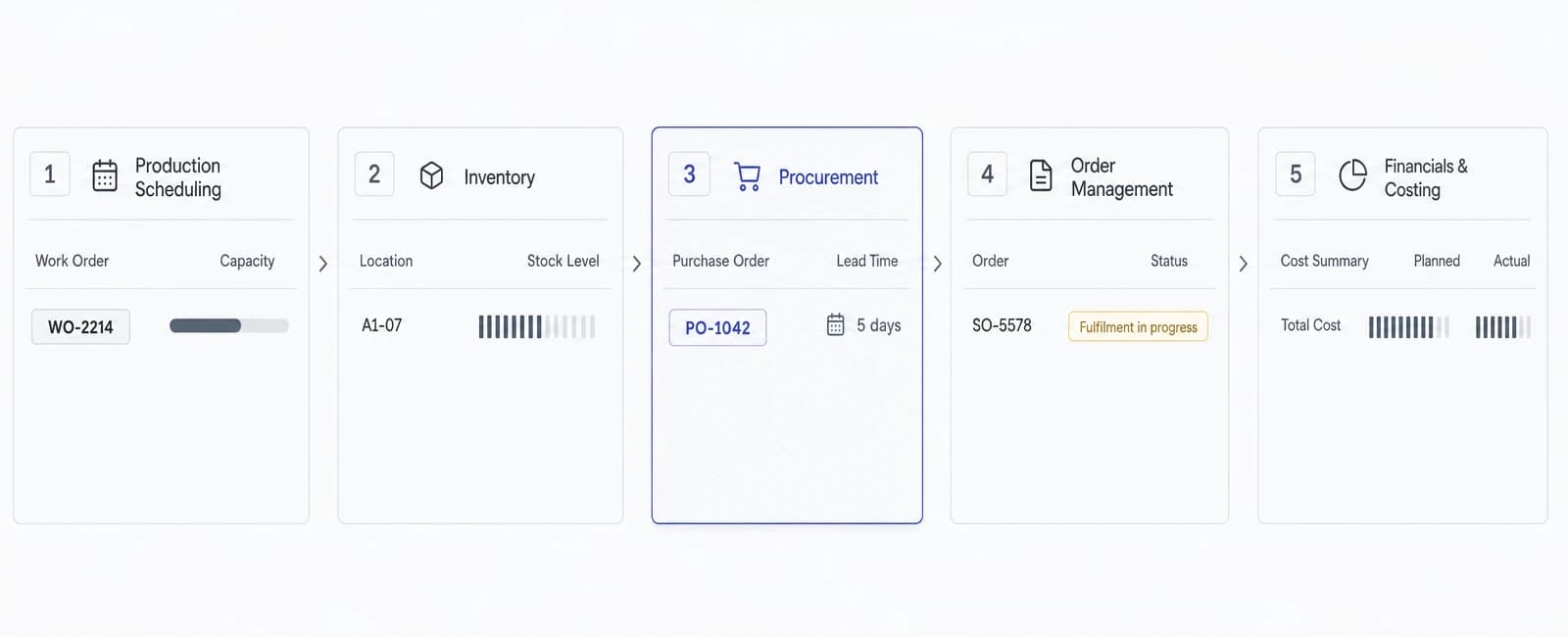
An ERP (Enterprise Resource Planning) system, in this reference architecture, is a central platform for production planning, inventory, procurement, and financials — replacing the spreadsheets and disconnected point tools many manufacturers accumulate over time. It illustrates how North Tech Labs would approach a custom ERP build or modernisation, phased by module and integrated with a plant's existing systems, not a description of a system already delivered to a named client.
The business problem
Many manufacturers run core planning and finance activity on a mix of spreadsheets, an aging legacy system, and manual reconciliation between departments. Production planning lives in one spreadsheet, inventory counts in another, and purchase orders are tracked over email — each accurate in isolation but not connected to the others.
That fragmentation makes basic questions surprisingly hard to answer quickly: whether there's enough raw material on hand to accept a new order, what a production run actually cost once materials and labour are accounted for, or whether a supplier delivery is late enough to affect the schedule. The information usually exists somewhere; it just isn't in one place.
Off-the-shelf ERP suites exist to solve this, but they often assume a generic set of workflows that don't match how a specific plant actually operates, and can require replacing systems that work fine on their own. A custom ERP, as a category, is a way to centralise planning, inventory, procurement, and financial data around a manufacturer's actual processes while keeping the specialised systems already in place.
This is not a claim that a single platform can or should replace every existing system on day one. The reference architecture below assumes coexistence with MES, WMS, and accounting systems as the starting point, with centralisation happening incrementally, module by module.
Intended users & roles
- Production plannerBuilds and adjusts the production schedule based on order demand, material availability, and equipment or labour capacity.
- Inventory or warehouse leadTracks stock levels across raw materials, work-in-progress, and finished goods, and reconciles physical counts against system records.
- Procurement leadManages supplier relationships, purchase orders, and lead times, and needs visibility into what's needed and by when.
- Finance or controllerReviews production costs, margins, and cash flow implications, and needs financial data that reflects what's actually happening on the floor.
- Plant managerNeeds a consolidated view across planning, inventory, and cost to make day-to-day operational decisions and resolve cross-department conflicts.
Core modules
- Production planning & schedulingBuilds and adjusts production schedules against demand, material availability, and capacity constraints.
- Inventory managementTracks raw materials, work-in-progress, and finished goods across locations, with reconciliation against physical counts.
- Procurement & purchasingManages purchase requisitions, orders, supplier records, and lead-time tracking tied to planning and inventory data.
- Order managementTracks customer orders from entry through fulfilment, linked to inventory availability and the production schedule.
- Financials & costingConsolidates material, labour, and overhead costs against production activity, and feeds summarised data to accounting systems.
- Bill of materials (BOM) managementMaintains structured, versioned bills of materials that planning, inventory, and costing modules all reference consistently.
- Reporting & dashboardsSurfaces planning, inventory, procurement, and cost data in role-specific views instead of requiring several separate reports.
Example workflows
- Order-to-scheduleA new customer order would be checked against current inventory and planned production capacity, and the system would flag whether it fits the existing schedule or requires a plan adjustment for a planner to review.
- Material shortage flagAs a production run is scheduled, the system would check raw material availability against the bill of materials and flag a shortfall before the run starts, rather than discovering it on the floor.
- Purchase order to receipt reconciliationA purchase order would be tracked from creation through supplier confirmation to receipt, with quantity and timing discrepancies surfaced for procurement to follow up on rather than silently accepted.
- Production cost roll-upOnce a production run is complete, material, labour, and overhead data associated with it would be consolidated into a cost figure for that run, available to finance without manual spreadsheet reconciliation.
- Period-end financial summaryAt period close, the system would prepare a summarised view of production costs and inventory valuation for a controller to review before it's reflected in the accounting system.
Architecture overview
The platform would be built as a web-based backend service with role-specific interfaces for planners, warehouse staff, procurement, and finance — a Node.js API layer, PostgreSQL for transactional data (orders, inventory levels, bills of materials, cost records), and a background job layer for scheduled reconciliation and reporting tasks.
A relational schema is a deliberate choice here: production planning, inventory, and financial data have well-defined relationships and consistency requirements — a stock quantity or a bill of materials can't be allowed to drift into an inconsistent state — which favours PostgreSQL's transactional guarantees over a more loosely structured data store.
The system is designed to run on standard cloud infrastructure (AWS is the example used throughout this reference architecture), with clear integration boundaries to existing MES, WMS, and accounting systems defined as explicit API contracts rather than direct database access, so each system can evolve independently.
Reporting and dashboard views are built from the same transactional data rather than a separate, hard-to-reconcile reporting store, reducing the chance that a dashboard and the underlying system show different numbers.
- Production planning & scheduling
- Inventory management
- Procurement & purchasing
- Order management
- Financials & costing
- Bill of materials (BOM) management
- Reporting & dashboards
- MES integration
- WMS integration
- Accounting system integration
- Supplier and customer data exchange
- Validation before write
- Role-based permissions
- Full audit trail
- Segregation of duties
- Data retention & handling
- Encrypted storage & transit
Data & integration flow
- MES integrationProduction execution data from an existing MES, where one is in place, feeds actual run status and output back into planning and costing rather than requiring manual entry.
- WMS integrationWarehouse management data — stock movements, locations, receipts — is synchronised with the ERP's inventory module through a defined API rather than duplicated data entry.
- Accounting system integrationSummarised cost and financial data is exported to an existing accounting system on a defined schedule, rather than the ERP attempting to replace core accounting functions outright.
- Supplier and customer data exchangePurchase orders and customer order confirmations can be exchanged with suppliers or customers through structured formats (e.g. EDI or API) where those integrations already exist.
- Validation before writeData entering from any integrated system is validated against expected schemas and business rules before it updates inventory, planning, or financial records.
Security, governance & permissions
- Role-based permissionsAccess to planning, inventory, procurement, and financial data and actions is scoped by role, consistent with least-privilege access rather than broad default access.
- Full audit trailChanges to inventory counts, purchase orders, schedules, and cost records are logged with who made the change and when, supporting later review.
- Segregation of dutiesFinancially sensitive actions, such as approving a purchase order above a defined threshold, can require a second approver distinct from the person who created the request.
- Data retention & handlingWhat data is stored, for how long, and how it's archived are explicit, documented decisions rather than defaults left unexamined.
- Encrypted storage & transitData at rest and in transit is encrypted, consistent with standard practice for systems handling operational and financial data.
Relevant services
The engineering disciplines behind ERP (Enterprise Resource Planning).
- Custom Software DevelopmentDesign and development of secure, scalable custom software for companies across Sweden and the Nordic region.
- Data Engineering & AnalyticsData pipelines, warehousing, quality validation and BI reporting built to make scattered operational and sensor data reliable enough to trust.
- API Development & Systems IntegrationAPI design, partner integrations, and systems-integration engineering connecting ERP, MES, WMS, and third-party platforms into a reliable data flow.
- Legacy System ModernizationAudit-led legacy system modernization with incremental, strangler-fig migration and phased cutover for companies across Sweden and the Nordic region.
Relevant industries
Where a system like ERP (Enterprise Resource Planning) creates the most value.
Related solutions
- Manufacturing Execution System (MES)A reference architecture for a Manufacturing Execution System that tracks work orders, machine activity, and quality checkpoints on the shop floor in real time — coordinating execution, not business planning or finance, and designed to work alongside a plant's existing ERP.
- Warehouse Management System (WMS)A reference architecture for a warehouse management system that combines mobile scanning, real-time inventory tracking, and pick/pack/ship coordination — integrated with existing ERP and transport management systems rather than replacing them.
- Customer & Partner PortalA reference architecture for a self-service portal that gives external customers or partners secure, scoped visibility into their own orders, documents, and account data — sourced from existing internal systems rather than a parallel copy of them.
Delivery & implementation considerations
- Phased rollout by moduleTypically implemented one module at a time — often inventory or procurement first — rather than a single big-bang cutover across planning, inventory, procurement, and financials at once.
- Coexistence with existing systemsDesigned to integrate with a manufacturer's existing MES, WMS, and accounting systems rather than requiring their replacement from day one.
- Data migration and reconciliationHistorical inventory, supplier, and cost data is migrated and reconciled against existing records before a module goes live, rather than starting from an empty system.
- Parallel running before cutoverA new module is typically run alongside the existing spreadsheet or legacy process for a defined period so discrepancies can be caught before the old process is retired.
- Training and change managementPlanners, warehouse staff, and finance users need structured training and documentation, since a centralised ERP changes day-to-day workflows that spreadsheets and email previously supported informally.
Frequently asked questions
Is this a system you've already built for a client?
No. This page describes a representative reference architecture illustrating our approach to this category of problem — it is not a case study of a completed client project.
Does this replace our existing MES or WMS?
No. The architecture is designed to integrate with an existing MES and WMS through defined interfaces, not to replace them. Centralising data happens at the integration layer, not by displacing systems that already work.
Do we have to migrate everything at once?
No. The reference architecture assumes a phased rollout, typically one module at a time, with parallel running against existing spreadsheets or legacy processes before each module goes live.
Can this replace our accounting software?
No. The architecture is designed to export summarised cost and financial data to an existing accounting system, not to replace core accounting functions.
Is this specific to one industry?
The reference architecture is illustrated with manufacturing terminology and workflows, since that's where this category of problem is most common, but the underlying pattern — centralising planning, inventory, procurement, and financial data — can apply to other operationally complex businesses.
How accurate is a cost roll-up like this?
It depends on the accuracy and timeliness of the underlying material, labour, and production data feeding it. The architecture is designed to consolidate that data, not to fabricate accuracy the source data doesn't have.
Further reading
- Custom ERP vs. Off-the-Shelf ERP - What's Actually DifferentHow custom and off-the-shelf ERP actually differ: process fit, module bloat, data ownership, and migration risk - plus a decision framework.
- Enterprise Architecture: Connecting Systems Without Creating ChaosA practical guide to enterprise architecture: integration patterns, system of record, data sync tradeoffs, governance, and auditing your system landscape.
Ready to discuss your project?
This page describes a representative architecture, not a fixed package. Tell us about your actual requirements and we'll assess what genuinely applies.