This page describes a representative solution and reference architecture. It is not presented as a client case study or as evidence of a completed implementation.
Warehouse Management System (WMS)
A reference architecture for a warehouse management system that combines mobile scanning, real-time inventory tracking, and pick/pack/ship coordination — integrated with existing ERP and transport management systems rather than replacing them.
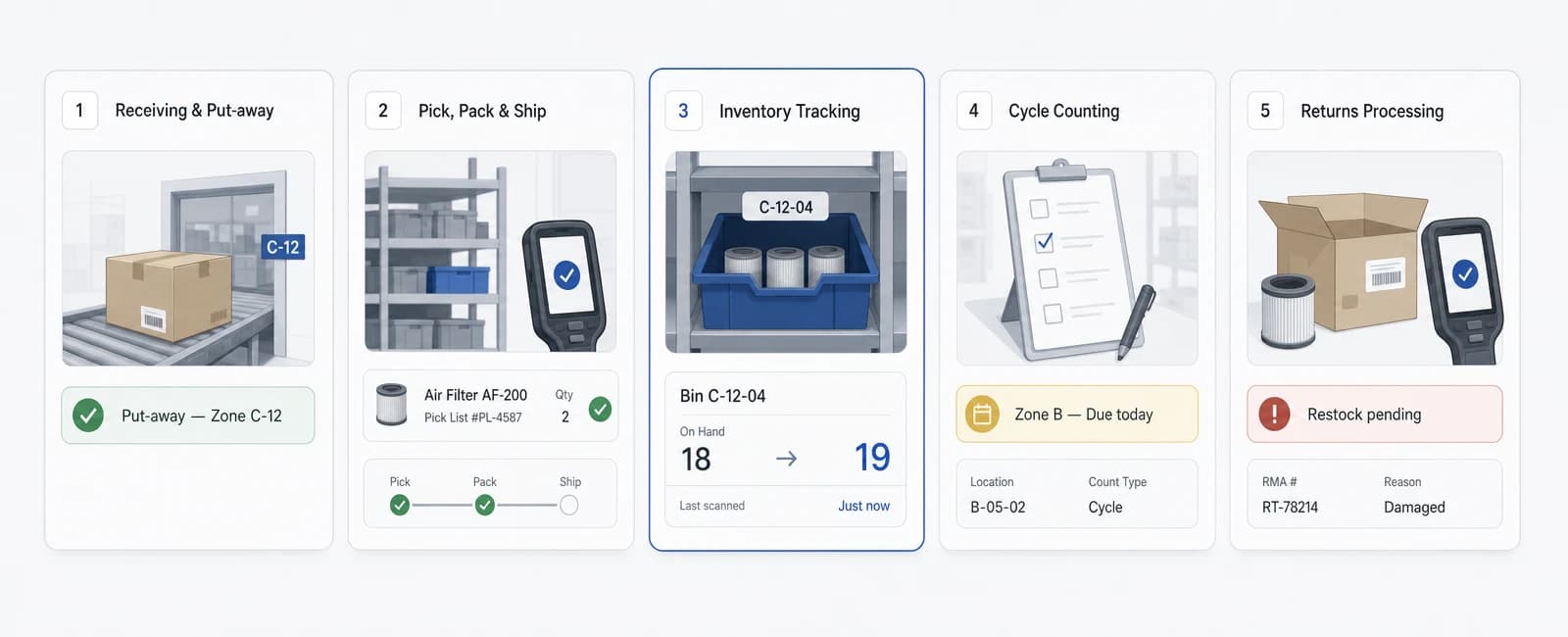
A Warehouse Management System (WMS) is a representative reference architecture for coordinating inventory, storage location, and pick/pack/ ship activity inside a warehouse using mobile scanning, a real-time inventory database, and integration with existing ERP and transport management systems. It illustrates how North Tech Labs would approach a common warehouse-operations need — replacing manual stock tracking and paper-based pick lists with a system operators actually use on the floor — not a description of a system we have already built for a named client.
The business problem
Many warehouse operations track inventory through a mix of spreadsheets, paper pick lists, and whatever stock counts happen to be in the ERP at the time — updated periodically rather than in real time. The gap between what the system says is in stock and what's actually on the shelf tends to widen as order volume grows, and it's usually only discovered during a cycle count or, worse, when a customer order can't be fulfilled.
Pick, pack, and ship processes built around printed pick lists depend on a picker's memory of the warehouse layout and manual cross-checking at each stage. There's no real-time way for a supervisor to see where an order is in the process, which items were substituted or short-picked, or which zone is falling behind, until the order is already late.
Put-away decisions — where a newly received item should be stored — are often made ad hoc, based on whatever space is nearest, rather than by any rule that accounts for pick frequency, item size, or zone capacity. Over time this makes fast-moving items harder to reach and slows down the picking process it was meant to serve.
A warehouse management system, as a category, addresses these specific gaps — real-time inventory visibility down to a storage location, scanner-driven pick/pack/ship workflows, and a defined basis for put-away and slotting decisions — rather than promising a fully automated warehouse or a specific accuracy percentage without reference to the operation it would run in.
Intended users & roles
- Warehouse operatorUses a handheld scanner to receive, put away, pick, pack, and ship inventory, following system-directed tasks rather than a printed list.
- Inventory managerMonitors stock levels and locations, reviews discrepancies flagged by cycle counts, and adjusts records after verification.
- Dispatch coordinatorTracks orders moving through pick/pack/ship, prioritizes outbound work, and coordinates with carriers on ready-to-ship shipments.
- Warehouse supervisorOversees floor activity across zones, reassigns tasks to balance workload, and reviews exceptions such as short picks or damaged stock.
- Systems administratorManages user roles, scanner device provisioning, and the integration configuration between the WMS and existing ERP or TMS systems.
Core modules
- Real-time inventory trackingMaintains stock quantity and location at the bin or shelf level, updated as each scan event occurs rather than on a periodic batch cycle.
- Barcode/RFID scanning integrationHandheld and fixed scanners capture item, location, and quantity data at each touchpoint, feeding directly into the inventory record.
- Receiving & put-awayGuides an operator through receiving incoming stock and directs put-away to a suggested location based on defined slotting rules.
- Pick/pack/ship workflowsDirects operators through order picking, packing verification, and shipment preparation, with each step confirmed by a scan.
- Put-away & slotting optimizationSuggests storage locations for incoming items based on pick frequency, item dimensions, and zone capacity rather than nearest-available space.
- Cycle countingSchedules and guides partial inventory counts by zone or item category, so discrepancies are caught incrementally rather than only at a full annual count.
- Returns processingGuides an operator through inspecting, restocking, or quarantining returned items and updates inventory accordingly.
- Zone & task managementDivides the warehouse into zones and assigns, balances, and tracks tasks across operators working within them.
Example workflows
- Inbound receiving to put-awayA delivery would arrive and an operator would scan each item against the expected purchase order, with the system flagging quantity mismatches for review and suggesting a put-away location for confirmed items based on current slotting rules.
- Order picking with directed routingAn incoming order would generate a pick task, and the system would route the operator through the warehouse in an order intended to minimize walking distance, with each pick confirmed by scanning the item and bin location before the task advances.
- Pack verification and shipment handoffOnce picking is complete, packed items would be scanned again against the order before a shipping label is generated, so a short pick or wrong item would be caught before the shipment leaves the building rather than after a customer complaint.
- Cycle count discrepancy reviewA scheduled cycle count would surface a mismatch between recorded and counted quantity for a location, and the discrepancy would be routed to an inventory manager for review and adjustment rather than silently overwriting the recorded value.
- AI-assisted slotting suggestionBased on historical pick frequency and item characteristics, the system would suggest a re-slotting recommendation for review by a supervisor, who would approve or reject the change rather than have it applied automatically.
Architecture overview
The system would be built around a Node.js API backend and a PostgreSQL database holding the authoritative inventory and location records, paired with a React Native mobile application running on handheld scanning devices used by warehouse operators on the floor.
Scan events from handheld devices would be transmitted to the backend in near real time, with the mobile client queuing scans locally and syncing once connectivity is restored, since warehouse floors — particularly in areas with dense metal racking — commonly have inconsistent wireless coverage.
The system would integrate with a company's existing ERP for order and product master data, and with transport management or carrier systems for shipment creation and tracking, rather than replacing either system. AWS is used as the example cloud infrastructure throughout this reference architecture.
A defined event pipeline would connect scan activity, task state changes, and inventory adjustments across the receiving, put-away, picking, and shipping modules, so a supervisor's dashboard reflects floor activity within seconds rather than after a batch sync.
- Real-time inventory tracking
- Barcode/RFID scanning integration
- Receiving & put-away
- Pick/pack/ship workflows
- Put-away & slotting optimization
- Cycle counting
- Returns processing
- Zone & task management
- ERP integration
- Transport management / carrier integration
- Scan event ingestion
- Offline queue & sync
- Inventory adjustment audit feed
- Role-based permissions
- Full audit trail
- Device & session management
- Data retention & handling
- Encrypted storage & transit
Data & integration flow
- ERP integrationProduct master data, purchase orders, and sales orders are synchronized with the existing ERP through a defined API integration, with the ERP remaining the system of record for financial and order data.
- Transport management / carrier integrationCompleted shipments generate carrier labels and tracking events through integration with existing TMS or carrier APIs, rather than a separate manual shipping step.
- Scan event ingestionHandheld and fixed scanner events flow through a defined ingestion pipeline that validates item and location codes before they update the inventory record.
- Offline queue & syncMobile devices queue scan events captured while offline and sync them once connectivity returns, reconciling any conflicting updates rather than silently discarding either version.
- Inventory adjustment audit feedEvery inventory adjustment — from a cycle count, a discrepancy resolution, or a returns transaction — is written to an auditable adjustment log alongside the updated quantity.
Security, governance & permissions
- Role-based permissionsAccess to receiving, picking, adjustment, and administrative functions is scoped by role, consistent with least-privilege access rather than broad default access for all warehouse staff.
- Full audit trailEvery scan, task completion, and inventory adjustment is logged with the operator and timestamp, supporting later review of discrepancies or process exceptions.
- Device & session managementHandheld devices are provisioned and authenticated individually, so lost or reassigned devices can be deactivated without affecting other operators.
- Data retention & handlingWhat scan and location data is stored, and for how long, is an explicit, documented decision — not a default left unexamined.
- Encrypted storage & transitInventory, order, and location data are encrypted at rest and in transit, consistent with standard practice for systems handling operational business data.
AI controls
- Human review for slotting changesPut-away and slotting recommendations generated from pick-frequency analysis are suggestions requiring supervisor approval, not automatically applied changes.
- Confidence and threshold checksA re-slotting suggestion below a defined confidence threshold, or affecting a limited number of items, is surfaced for review rather than acted on automatically.
- Deterministic inventory math stays deterministicQuantity calculations, reservations, and stock adjustments are implemented as regular application logic, never delegated to a model's judgment.
Relevant services
The engineering disciplines behind Warehouse Management System (WMS).
- Custom Software DevelopmentDesign and development of secure, scalable custom software for companies across Sweden and the Nordic region.
- Mobile App DevelopmentProduct-focused mobile application development for iOS and Android, from architecture and UX to release and ongoing evolution.
- IoT & Connected Systems SoftwareSoftware for ingesting, processing, and acting on data from connected equipment and field devices, integrated with your existing operational systems.
Relevant industries
Where a system like Warehouse Management System (WMS) creates the most value.
- Logistics and MobilityCustom logistics, fleet, mobility and transport software for companies managing complex operations across the Nordic region.
- ManufacturingCustom manufacturing software, operational platforms and connected systems for companies modernising production across Sweden and the Nordic region.
- Retail and eCommerceCustom retail and eCommerce software — omnichannel inventory, checkout, personalization and returns systems for companies across Sweden and the Nordic region.
Relevant technologies
The stack Warehouse Management System (WMS) is built on.
Related solutions
- ERP (Enterprise Resource Planning)A reference architecture for a custom ERP platform that centralises production planning, inventory, procurement, and financials — built to integrate with a manufacturer's existing MES, WMS, and accounting systems rather than replace them outright.
- Manufacturing Execution System (MES)A reference architecture for a Manufacturing Execution System that tracks work orders, machine activity, and quality checkpoints on the shop floor in real time — coordinating execution, not business planning or finance, and designed to work alongside a plant's existing ERP.
- Fleet Management PlatformA reference architecture for a fleet management platform that turns existing telematics and GPS data into real-time vehicle visibility, coordinated dispatch, and proactive maintenance scheduling — as a software layer on top of hardware a fleet already has.
Delivery & implementation considerations
- Phased rollout by zone or warehouseTypically implemented one zone or single warehouse at a time — proving out scanning workflows and data accuracy before extending to the full facility or additional sites.
- Coexistence with existing systemsDesigned to integrate with a company's existing ERP and transport management systems rather than requiring their replacement.
- Device and connectivity assessmentExisting wireless coverage and available scanning hardware are assessed early, since mobile workflow design depends on realistic floor conditions rather than assumed constant connectivity.
- Parallel-run before cutoverNew scanning-driven workflows are typically run alongside existing paper or spreadsheet processes for a defined period before the legacy process is retired.
- Operator training and adoptionScanning workflows are designed for quick pickup on the floor — adoption depends on the system being faster than the paper process it replaces, not on lengthy training alone.
Frequently asked questions
Is this a system you've already built for a client?
No. This page describes a representative reference architecture illustrating our approach to this category of problem — it is not a case study of a completed client project.
Does this system guarantee a specific inventory accuracy rate?
No. Achievable accuracy depends on the operation's processes, scanning discipline, and data quality, so we don't attach a guaranteed percentage to a reference architecture that isn't tied to a specific warehouse.
Does the slotting optimization module run without human review?
No. Slotting and put-away suggestions are recommendations for a supervisor to approve — the architecture doesn't apply storage-location changes automatically.
Can this replace our existing ERP?
No. It's designed to integrate with an existing ERP for order and product master data, not to replace it — the WMS handles warehouse floor execution, not financial or order-of-record systems.
Will this work in a warehouse with poor wireless coverage?
The mobile scanning application is designed to queue scans captured offline and sync once connectivity returns, but any deployment should still include an assessment of existing wireless coverage as part of planning, since floor conditions vary significantly between facilities.
Does this cover multiple warehouses from day one?
Not typically. The architecture is designed for a phased rollout starting with a single zone or warehouse, with additional sites added once the initial rollout is validated.
Further reading
- Software Platforms for Logistics Operations: What to BuildA practical guide to fleet telematics, warehouse management, route optimization, and shipment visibility, and how to sequence logistics software investment.
- Warehouse Management Systems - Build vs. BuyA build-vs-buy framework for warehouse management systems: TCO, integration, data accuracy, and when a hybrid WMS approach makes sense.
Ready to discuss your project?
This page describes a representative architecture, not a fixed package. Tell us about your actual requirements and we'll assess what genuinely applies.